Exterior of a neoclassical United States courthouse with columns and steps

Supreme Court Ruling Protects Health Coverage for Millions

Statement attributable to: Jeremy A. Lazarus, MD President, American Medical Association   The American Medical Association has long supported health insurance coverage for all, and we are pleased that this decisionPDF FIle means millions of Americans can look forward to the coverage they need to get healthy and stay healthy. “The AMA remains committed to working on behalf of America’s physicians and patients to ensure the law continues to be implemented in ways that support and incentivize better health outcomes and improve the nation’s health care system. “This decision protects important improvements, such as ending coverage denials due to pre-existing conditions and lifetime caps on insurance, and allowing the 2.5 million young adults up to age 26 who gained coverage under the law to stay on their parents’ health insurance policies. The expanded health care coverage upheld by the Supreme Court will allow patients to see their doctors earlier rather than waiting for treatment until they are sicker and care is more expensive. The decision upholds funding for important research on the effectiveness of drugs and treatments and protects expanded coverage for prevention and wellness care, which has already benefited about 54 million Americans. “The health reform law upheld by the Supreme Court simplifies administrative burdens, including streamlining insurance claims, so physicians and their staff can spend more time with patients and less time on paperwork. It protects those in the Medicare ‘donut hole,’ including the 5.1 million Medicare patients who saved significantly on prescription drugs in 2010 and 2011. These important changes have been made while maintaining our American system with both private and public insurers.”

Related Reading

Direct Primary Care: Access Problems in Today’s Clinics Emergency Room vs Urgent Care: Which Should You Choose? Why Are Some U.S. Physicians Moving to Canada to Practice?

Scott Rennie, D.O.
Board Certified in Obesity Medicine and Family Medicine

This blog is for educational purposes only and does not constitute individual medical advice. Always consult your own physician before making changes to your health, medications, or treatment plan.


Woman thinking beside a laptop at a kitchen table

Can You Trust All the Health Information You Find Online?

shutterstock_172524281With all the information out there on the internet, in magazines, books, newsletters, radio, hotlines and on television, sometimes it’s hard to know where to go for information to learn about health and diseases on your own.  I encourage most of my patients to use technology, but I want them to have a list of resources to search when they are looking for information and be able to judge whether it comes from a credible source.  A huge amount of information is available online, however sometimes it’s of variable quality and can be difficult for the patient to decide whether or not a particular source is credible.

I think it’s the medical providers responsibility to educate patients on how they can do their own research, because patients may not have:

1)   An understanding of the biology of the disease process

2)   Knowledge about how to determine if the information is credible based on the type of research study (i.e. case report, single randomized trial or double blinded trial with placebo).

3)   Skepticism about the information that may come from biased sources such as from a drug company, from authors with financial conflict of interests and intellectual zeal, or wish for personal aggrandizement.

4)   Familiarity with how a patient with the disease presents and the signs and symptoms of the illness

5)   An understanding how good scientific research done by well trained scholars in centers of academic excellence

Some hints on finding trustworthy information online:

1)   Was the website recommended from someone you trust, such as your physician, the National Institute of Health or A Medical Library Association?  I recommend using a trusted source of information rather than relying on a search engine and using the first or second webpage that comes up in the search.

2)   Sites such as the Mayo Clinic (http://mayoclinic.com) that display the seal logo on their page.

3)   Websites that are sponsored by medical schools, or the government

4)   If you type your question into a general search engine such as yahoo, or Google, use multiple sites and compare the information based on the criteria below.

How do you know if a website is good quality?  Here are some possible factors to consider:

1)   Who created the website?  Anyone can create a website or blog and the information all is printed and looks legit, but is it?  Is it a well known and respected organization or recommended site by someone you trust?

2)   What is the purpose of the website?  Consider who the intended audience is, and how it was created.

3)   What are the funding sources for the website?  Do the producers of the website have some financial interest or sell something that may bias the information presented on the site?

4)   Consider the date that the information was released.  Medical research is rapidly advancing and the information may be dated.  Look for a date that the site updated or posted the information.

5)   Consider the evidence when examining the treatment recommendations.

6)   Personal experiences of the authors may make for interesting reading material, but should be clearly marked as personal experiences and not be the only rationale for the recommendations.

7)   The author of the website or blog should be available for communication and response.

8)   The website should explain if there are conflicts of interest or limitations in the information provided and that the information does not replace contact with a medical provider or physician.

9)   If there are forums, bulletin boards or interactive chat rooms, be wary of who the participants are.

The Medical Library Association has created a set of criteria to help patients judge the quality of websites for themselveswww.mlanet.org/resources/userguide#3

The US Government has also created a guide called A User’s Guide to Finding and Evaluating Health Information on the webwww.healthfinder.gov

Books:  Some credible books that are produced by the government or medical schools include:

1)   Mayo Clinic Health Book, 4th Ed. New York Time Home Entertainment, 2009

2)   Harvard Medical School Family Health Guide, 1st Edition. New York; Simon and Shuster, 2005

3)   American Medical Association Family Medicine Guide, 4th Ed. Indianapolis, IN, Wiley 2004

Magazines:  Consumer Reports and American Family Physician publish information responsibly.  The information from the American Family Physician magazine is intended for medical providers and may use medical jargon that is less helpful for the average patient however.

Newspapers:  The New York Times and Washington Post have medical writers who are scientific backgrounds and often provider information in a very captivating way.


I hope that you have found this information useful.  Wishing you the best of health,

Related Reading

A Handy List of Health Resource Links Worth Bookmarking What the Apple iPad Might Mean for the Future of Medicine Why Some Conditions Need an In-Person Visit, Not Virtual Care

Scott Rennie, D.O.
Board Certified in Obesity Medicine and Family Medicine

This blog is for educational purposes only and does not constitute individual medical advice. Always consult your own physician before making changes to your health, medications, or treatment plan.

Healthcare professional in scrubs walking through a clinic hallway with tablet

How iPads Improve the Patient Experience in Clinics

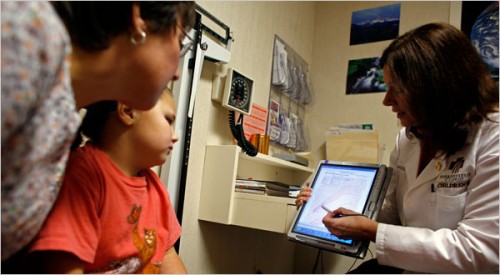
  Marianne Aiello, for HealthLeaders Media, April 11, 2012 Since the first-generation iPad hit the market in 2010, physicians have embraced the gadget and its apps, many of which enhance or expedite clinical care. But until recently, the patient experience has not been directly influenced by Apple’s hit device, other than by way of the patient being impressed with their physician’s technological prowess. Lately, app developers and hospitals have been rethinking the iPad’s potential in the patient experience and have been using the tablet in creative ways. iPads as Patient Guides Mayo Clinic has begun using content- and app-loaded iPads to help guide patients through their hospital experience. Earlier this month the health system posted a video depicting iPad use on its YouTube page. Each heart surgery patient is given an iPad to help them visualize and prepare for their plan of care. “The iPad is a nice way to navigate through some of those resources and keep track on a daily basis that you’re doing the things you need to do to make sure you’re doing the things that you should be,” heart patient Randy Sterner said in the video. From what we can see in the video, the tailored app includes the patient’s daily schedule, information about the hospital stay, patient education information, and notes about planning for recovery. It also allows patients to report on levels of pain they are experiencing or exercises they have completed. The reports are instantly transmitted to the patient’s care team. Verdict: Though most hospitals are not currently able to afford this extent of patient iPad use, it gives us a hopeful glimpse at the future of using technology to inform and educate patients. Of course, even in the future this technology is only supplemental to hands-on caregiver interaction. iPads to Customize the MRI A new app called the Caring MR Suite allows patients to customize MRI settings, to  creating a more positive experience. The app lets patients select lighting, music, images, and video to be available during their scan. Patients can even dock their own iPhones or iPods to listen to their own music or watch their own videos, which are displayed on a screen in the ceiling. Special LED light fixtures and high-resolution displays are embedded in the walls and ceilings of the suite and controlled by the iPad. There is a video depicting the suite on the YouTube page for GE Healthcare, which manufactures the model. Verdict: While I imagine this is a substantial investment, it’s one of the best ways I’ve seen of making what is often a intimidating and scary experience more bearable. Allowing the patient to tailor the MRI experience, it gives them some sense of control back. iPads Replacing Check-in Forms An HR platform called Drchrono markets an iPad app called OnPatient, which allows hospitals to check patients in via iPad instead of paper forms and clipboards. Healthcare providers can create a customized check-in form. Then when patients fill out the for the first time, they input their personal, demographic, and insurance information, take a profile photo, review their medications and allergies, and their records are saved for future use. The app integrates with Drchrono’s full suite of iPad EHR services aimed at helping caregivers modernize their record keeping processs. “The OnPatient check-in app digitizes the waiting room and eliminates significant barriers to mass adoption of patient check-in technology by leveraging sophisticated iPad technology,” Michael Nusimow, co-founder and CEO of Drchrono, told Mashable. “We designed the OnPatient app to be intuitive for both physicians and patient users to create a better patient check-in experience.” Verdict: This process is not ideal for all patients, especially the elderly and the technologically unfamiliar, but would be a hit with Gen-X and Gen-Y. It may be an asset for hospitals reaching out to younger demographics. iPads for Virtual Physician-Patient Communication By simply using the iPad’s Facetime feature, physicians and patients can video chat about the patient’s recovery progress. Henry Ford Hospital has been using this feature, which also comes on the newer iPhone and the latest generation iPod touch, to conduct a new initiative called “telerounding.” “Using the iPad to communicate really appeals to the type of patients that are seeking state-of-the-art, minimally invasive robotic surgery at Henry Ford,” Dr. Craig Rogers, MD, director of Renal Surgery and director of Urologic Oncology at Henry Ford, told Detroit’s HomeTownLife.com. “Patients are looking for us to use current technology in a way that improves their care, and ‘telerounding’ with the iPad really fits that need in enhancing the communication and care following surgery.” Replacing some phone calls with video chats, patients can have a more personal and informative conversation with their physician. Henry Ford physicians have said they benefit by being able to physically see their patients to get a sense of their post-op condition. Verdict: This is the most cost-effective, efficient, and flexible use of the iPad to improve the patient experience. Not only does this practice help physicians on the clinical side, it gives patients the positive feeling of personalized care even when they are miles away from the hospital.

Related Reading

What the Apple iPad Might Mean for the Future of Medicine Google Glass: Is It Really Ready for Prime Time Yet? Can Telemedicine Diagnose Strep Throat and Ear Infections?

Scott Rennie, D.O.
Board Certified in Obesity Medicine and Family Medicine

This blog is for educational purposes only and does not constitute individual medical advice. Always consult your own physician before making changes to your health, medications, or treatment plan.

A tablet and a stethoscope on a wooden desk beside a closed notebook

What the Apple iPad Might Mean for the Future of Medicine

This article was written back in August on nursingschools.net blog, but I think it’s interesting and discusses how the iPad may be one solution to help health care providers in Medicine. New technology has the potential to change the way we do things, from changing a single part of a routine to altering the game plan entirely. Many have lauded Apple’s new iPad as one of these revolutionary technologies, and one that has great potential to be used in fields like education, business and even medicine. Whether or not the iPad can truly revolutionize the way treatment is carried out at hospitals around the nation is yet to be seen, but there is a lot of buzz about it, and more and more facilities are willing to give it a try in their day-to-day practice. If you’re curious about what the iPad could mean for medicine, from nursing schools to nursing homes, take a look at these potential applications, articles and even apps to see what the iPad could change, make easier, and streamline for medical facilities. Applications There are a wide range of ways that the iPad has been suggested for use in the hospital setting. Here are just a few applications that can show you what the iPad could mean for changing the way you do patient care in your hospital. • Accessing patient records. The iPad makes it simple to bring up and page through all kinds of patient records, including photos, radiology images, and much more. • Writing prescriptions. For hospitals with digital prescription systems, or even ones without, writing and getting a prescription filled for a patient could easily work with the iPad at the touch of a button. • Looking at x-ray images. Radiological images are already available to view on the iPhone with the right apps, but with the iPad, doctors and nurses will be able to see the images in a much larger size, making them more useful to the professionals and patients alike. • Sharing information with patients. With its fairly large screen, the iPad makes it possible to easily show patients images and information related to their treatment. And a better informed patient is more likely to be at ease and happier with treatment. • Communicating with hospital staff. Keeping in touch with those you work with in different parts of the hospital or even in different medical facilities altogether is incredibly easy with the functionality provided by the iPad. • Quickly finding images and diagnoses for patients. Not sure what exactly a bump or rash means on your patient? The iPad makes it simple to look up medical reference information with high resolution photos so you can improve the accuracy of your diagnoses. • Looking up other medical cases. If you’ve got a particularly difficult case to crack, you might need to do a little research. The iPad, working with some great apps, can help you do the research you need, contact other specialists and find the right information for the best treatment. • Sharing and publishing medical research. With the iPad, you’ll be able to read the latest research being done and even share your own discoveries as you’re making them, keeping you in the loop and helping doctors all over the world deliver the best care. • Taking patient history. While pen and paper can work fine for getting a patient history, taking it on the iPad means it can be instantly accessible for other doctors and nurses in the hospital and that it can be retrieved and modified in an instant. • Managing patient care. The iPad can make it simple to manage almost every level of patient care. Taking patient history, finding a diagnosis, writing prescriptions, sending a referral, helping patients understand their conditions and much more can all be done from one simple, easy-to-use device. Benefits Why use the iPad in a hospital and not some other form of technology? Here are some of the main benefits the device has to offer. • It’s small and portable. Doctors and nurses can easily carry the device around or stow it away in their pockets, keeping records, information and contacts close at all times. • It can make retrieving information a snap. The iPad’s processor and functionality make it simple and quick to pull up things like patient records at a moment’s notice and help medical personnel deliver care quickly and accurately. • It offers more visibility than a smartphone. Many doctors have been using the iPhone or other smartphones to do many of the things the iPad does, but the larger screen on the iPad means more visibility, making information easier to see, access and even share with patients. ‘• It’s relatively inexpensive. While the iPad isn’t exactly cheap, it can be as cost effective as a laptop, but with increased mobility that can make it especially useful in a hospital setting. • There are no additional fees. So long as you use your iPad on a local wi-fi server, you won’t need to incur any additional fees to use it. That can be a big savings from an iPhone which requires cell and data plans. • There’s a long battery life. Longer time without a charge means it can be used throughout the day without having to take a break, sometimes ten hours or more, something other tablets can’t match. • It could potentially interface with existing iPhone and mobile devices. Sharing information between two Apple products shouldn’t be a problem and could make it easy to transfer information and access it from multiple points. • There’s a small learning curve. The iPad is new, but it draws on technology from existing devices, so many will already be familiar with how to use it. And with a simple interface, even the most technology impaired can figure out how to use it. • It makes communication easy. Both within a medical facility and with other treatment facilities, the iPad can make sending, sharing and keeping track of patient information incredibly easy. • It is versatile. It could be carried around by medical personnel, mounted at the foot of patient beds, used by doctors, nurses, radiologists, pharmacists– the list goes on. And as the technology advances, the potential uses for it will as well. Disadvantages Using the iPad in a medical setting isn’t a perfect solution. Here are some ways that the product might not deliver and could mean needing more equipment to get the job done. • No Flash compatibility. Flash videos simply won’t play on Apple products, and it doesn’t look like Apple and Adobe will be coming to an agreement anytime soon. This could limit the types of medical information you can access. • No camera. If you need to take pictures of your patient’s condition, want to video chat or even just share images of your practice, you’ll need to use another device. Some suspect later versions of the iPad will have this function, but the current ones simply do not. • No Mouse. Those who use a lot of mouse-heavy applications may find themselves growing tired of scrolling and clicking with their fingers on the iPad. The iPad does not work with Apple’s bluetooth mouse. • Durability. The iPad is a pretty sturdy device, but it is yet to be seen how it would hold up against heavy, everyday use in a hospital setting. Additionally, because it’s always being carried, there’s a good chance it will be subjected to a drop or two. • You can’t swap batteries. While the iPad’s battery may last a long time, the fact that it can’t be swapped out for a fresh one makes it hard to use between different shifts and maintain continual care. Articles If you’d like to read more about how the iPad is impacting the practice of medicine, these articles are especially informative and useful. • iPad review for doctors: A hands on guide for medicine: If you’re working in the medical profession, check out this review of the device from a doctor’s perspective to see how it could be useful to you. • Apple’s iPad Health Impact for Doctors and Hospitals: Read this article to see how the iPad could change how you practice medicine. • Is the iPad About to Change Emergency Medicine?: In this post, you can read more about the potential for using the iPad in emergency medicine. • Japanese Surgeon Uses an iPad in Operation: Doubting the usefulness of the iPad in medicine? This Japanese doctor shows one way it can be a big help during surgery. • Medicine is the Apple iPad sweet spot: This writer talks about how the iPad is ideal for the medical setting. • Apple tablet reps spotted at LA hospital: Here, you’ll see that the iPad may have been designed partly with medical professionals in mind. • The iPad in Medicine: The Good, the Bad, and the Germy: Read about both the positives and the negatives that come with using the iPad in a medical setting here. • The iPad in Healthcare: A Game Changer?: Learn how the iPad could potentially change the way medical treatment works from this article. • iPhone Versus iPad In Healthcare: Read through this article to see the differences between using the iPhone and iPad in medicine and the advantages of each. • With the iPad, Apple may just revolutionize medicine: In this Washington Post article, Martha White explains how she thinks the iPad may truly change how doctors interact with patients and how hospitals run. Medical Apps Hoping to give the iPad a try in your medical facility? Consider these apps as great additions to the technology. • Blausen Human Atlas: In this great resource, medical professionals will find 3D images of the human body along with handy images and videos explaining a wide range of medical conditions. • Visual Dx Mobile: Not entirely sure what that rash is on your patient? Through this app, you’ll find images of thousands of dermatological conditions so you can make an accurate diagnosis. • Procedures Consult: Newbies to the medical field will love this app, with instructional videos on a procedures in a range of medical specialties, helping you know just what to do and how to do it. • Osirix: If you need to see radiology images on-the-go, this app can make it happen, with high quality and useful imagery at the touch of a button. • eFilm Mobile: This app is another mobile radiology tool, letting doctors and nurses easily take a look at scans from patients. • Papers: Check out this app for an easy way to look up new research papers, store them on your device and read them when you have a spare moment. • Lexi-Comp: Make sure your patients get the right medicines in the right dosages every time with the help of this prescription database. • MD on Call: For students, this can be an amazing tool for learning about some of the most common conditions they’ll be confronted with. They range from the simple to the complex, and courses of treatment are included as well, making it an excellent educational tool. • Medical History: With this application, doctors and nurses can capture, store and share a complete medical history of any patient. • ACLS Advisor: Again, this application can be a great tool for learning or as a refresher for doctors who don’t often deal with coding patients.

Related Reading

How iPads Improve the Patient Experience in Clinics Google Glass: Is It Really Ready for Prime Time Yet? Can You Trust All the Health Information You Find Online?

Scott Rennie, D.O.
Board Certified in Obesity Medicine and Family Medicine

This blog is for educational purposes only and does not constitute individual medical advice. Always consult your own physician before making changes to your health, medications, or treatment plan.

Leather doctor bag with stethoscope on welcome mat in front of blue door

Royal Pains the TV Show: Now Meet the Real-Life Version

The wildly successful USA Network show, Royal Pains has recently introduced the concept of concierge medicine to a broad audience. The idea of a private physician on retainer is not new, it’s actually an old notion that in the current light of healthcare reform and provider shortage is enjoying a type of renaissance.

Dr. Rennie with a young patient
Just think of the convenience of having a doctor come to you when you’re sick. How wonderful would it be when you already have a feverish or hurt child on your hands to not have to get them out of bed and drive them to the emergency room or urgent care center where they may have to wait a long time to be seen? Or perhaps you are too busy to leave the office, but still need to get your yearly physical or refills on your medications?  Maybe you are someone who has a tough time traveling to the doctor’s office due to physical restrictions?  We thought about all of these potential issues when I created our mobile concierge medical practice – Rennie Family Health.

We are the only private physicians in the greater Seattle area who come to your home or office same day for routine physicals, illness, or injury. Our practice is built around YOUR lifestyle. We are open 24 hours/day, 7 days/week, 365 days/year. All patients have my personal mobile number and can reach me at any time.

While our hero Dr. Hank Lawson prefers to cater exclusively to the privileged citizens in the uber-wealthy microcosm of the Hamptons, we have a slightly different philosophy and think high end, personalized medicine should be affordable to many more people. We have structured our packages and payment plans to be very affordable. We home you check out our website or view our video to learn more.

Related Reading

American Academy of Private Physicians Conference in Austin, TX Direct Primary Care: Access Problems in Today’s Clinics Watch Dr. Rennie’s New Video for Rennie Family Health

Scott Rennie, D.O.
Board Certified in Obesity Medicine and Family Medicine

This blog is for educational purposes only and does not constitute individual medical advice. Always consult your own physician before making changes to your health, medications, or treatment plan.

Tablet showing a heart-shaped home medical service logo with a red cross and play button.

Watch Dr. Rennie’s New Video for Rennie Family Health

Check out my new video for Rennie Family Health:


Spintext.com helped me create it, and they do excellent work. If you’re looking for an organization to help promote your practice with video or websites, I highly recommend them!

Related Reading

Royal Pains the TV Show: Now Meet the Real-Life Version American Academy of Private Physicians Conference in Austin, TX Shifting to Telemedicine: Reflections for Fellow Physicians

Scott Rennie, D.O.
Board Certified in Obesity Medicine and Family Medicine

This blog is for educational purposes only and does not constitute individual medical advice. Always consult your own physician before making changes to your health, medications, or treatment plan.

Remove all background people, empty room only

American Academy of Private Physicians Conference in Austin, TX

This last weekend, I attended a summit by the  AAPP (American Academy of Private Physicians) in Austin, Texas.  The meeting provided great networking opportunities and information for physicians who are interested in starting their own private medical practice. We learned from a panel of physicians of various backgrounds about their private practices and some ways that they have made them successful.  It was encouraging to hear how the patients and physicians have found concierge/private practice to be restoring to the the doctor-patient relationship of past times – unbound by insurance companies and provider network constraints.

Related Reading

Royal Pains the TV Show: Now Meet the Real-Life Version Direct Primary Care: Access Problems in Today’s Clinics Why Are Some U.S. Physicians Moving to Canada to Practice? Watch Dr. Rennie’s New Video for Rennie Family Health

Scott Rennie, D.O.
Board Certified in Obesity Medicine and Family Medicine

This blog is for educational purposes only and does not constitute individual medical advice. Always consult your own physician before making changes to your health, medications, or treatment plan.